Courier Sync Sri Lanka

Orders sync to couriers
automatically

The courier sync Sri Lanka sellers switched to. Stop copying order data, typing courier details, or managing spreadsheets, every order flows directly from Storemate to your courier network.

Free to start. Full setup handled by our team. No card needed.

4–6 hrs
Saved per staff member, every day
Hours that used to disappear into copy-paste and manual courier entry.
0%
Data entry error rate
All
Sri Lankan couriers supported
Live
Real-time sync dashboard
1-click
Resync on failure
Connected courier partners
Copy order from Facebook. Paste into Curfox. Repeat 80 times.
Wrong address typed. Wrong courier. Customer never receives.
Three courier portals. Three separate spreadsheets. One exhausted team.
Order entered twice by accident. Two packages shipped. One returned.
Special instructions never reached the courier. Wrong item packed.
Sync failed silently. Customer never received. Automatic return filed.
Copy order from Facebook. Paste into Curfox. Repeat 80 times.
Wrong address typed. Wrong courier. Customer never receives.
Three courier portals. Three separate spreadsheets. One exhausted team.
Order entered twice by accident. Two packages shipped. One returned.
Special instructions never reached the courier. Wrong item packed.
Sync failed silently. Customer never received. Automatic return filed.
The Manual Sync Problem

Hours lost daily to manual data entry

Every order manually typed into every courier portal. Every day. The mistakes, the time, the chaos, all preventable.

4–6 hrs
Lost every single day per staff member, just copying order data between systems. That's 120+ hours per month that produces zero value.

Copy & Paste Hell

Order arrives in Google Sheets or Excel. You copy it. Paste it into courier system. Every order. Every day. Hours disappear into zero-value work.

Data Entry Errors

Wrong address typed. Wrong item code entered. Wrong phone number pasted. Courier ships to wrong place. Customer returns. Margin gone entirely.

Multiple Couriers = Multiple Systems

Three courier companies. Three different portals. Three separate data entry processes. The same order typed three times. Chaos multiplied by three.

Duplicate & Lost Orders

Orders get entered twice by accident. Or forgotten entirely in the chaos between systems. Customer never receives. Return filed automatically.

Courier Communication Gaps

Special instructions don't reach the courier. Product descriptions missing. Waybills don't match the order. Courier confused. Wrong item packed. Return inevitable.

Team Coordination Nightmare

Multiple people entering the same order into different systems. Conflicts. Duplicates. Nobody knows what is synced and what is not. Confusion daily.

The Storemate Solution

Automatic sync that actually works

Orders flow from Storemate to your couriers without anyone touching them. Zero manual work, zero errors, complete visibility.

Sync Features , automatic order flow to couriers
Automatic Sync

Zero manual entry. Orders reach couriers automatically

Order processed in Storemate. It syncs to your courier instantly. No copy. No paste. No spreadsheet. No human in between. Clean, accurate data arrives at the courier every time.

  • Orders sync directly to courier portal the moment they're processed
  • No manual data entry required, ever
  • No typing errors causing wrong shipments
  • Courier receives complete, accurate information on the first attempt
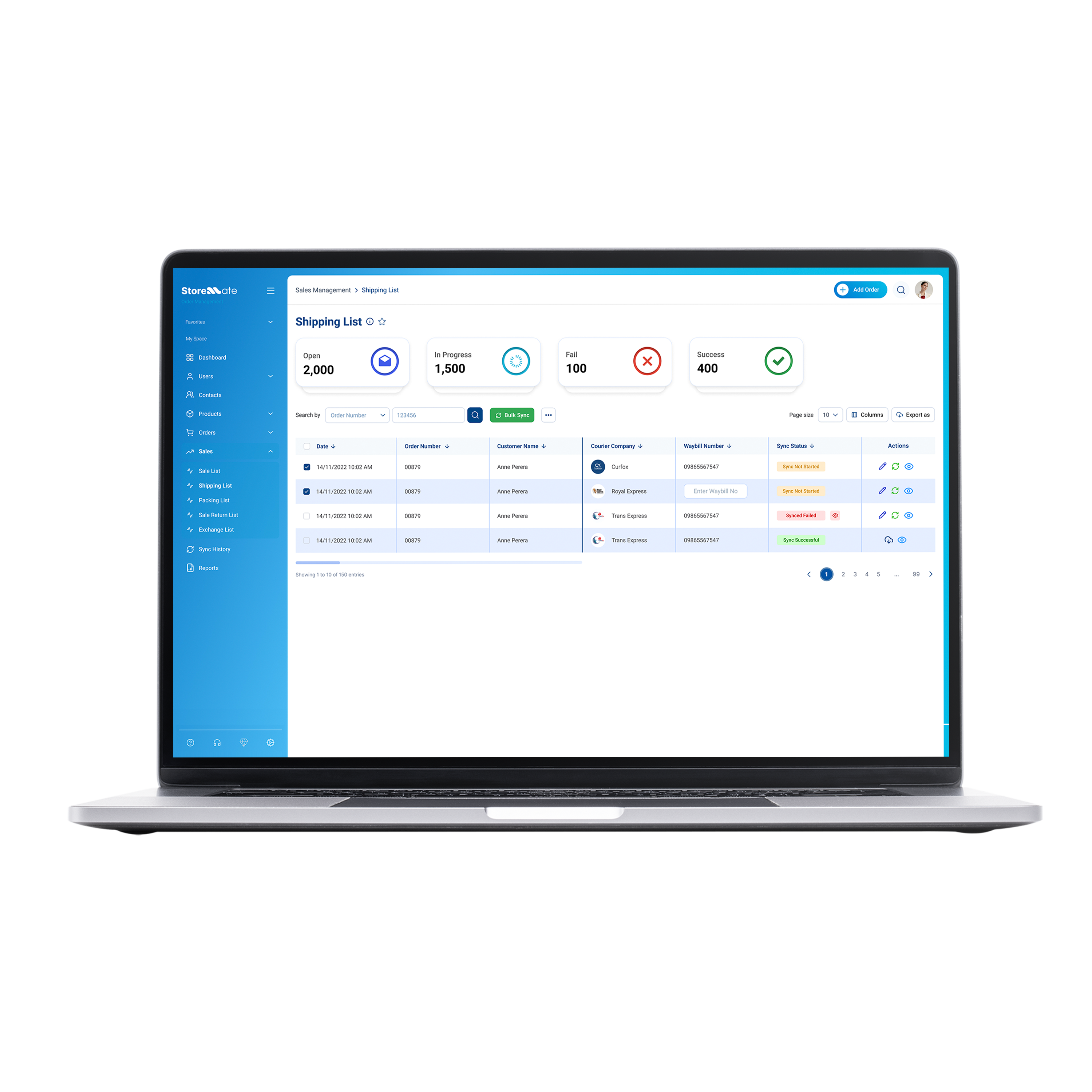
Storemate Shipping List, orders synced across couriers
Multi-Courier

One platform.
Every courier in Sri Lanka

Send the same order to multiple courier companies simultaneously. Compare delivery speeds and costs in real time. Choose the best option. Change at the last moment, no re-uploading needed.

  • Sync to Royal Express, TransEx, FDE, DomEx, Koombiyo and more from one screen
  • Compare carrier speed and cost before committing
  • Switch couriers at the last moment without re-entering data
  • One platform replaces three separate portals
Royal Express
FDE Express
DomEx
TransEx
Koombiyo
Live Dashboard

See every order syncing in real time, no black holes

Dashboard shows exactly what is syncing right now, what completed successfully, and what failed. Complete visibility into your courier pipeline. No mysteries, no lost orders.

  • Live view of all syncing orders at any moment
  • Successful syncs confirmed the moment they complete
  • Failed syncs flagged instantly, never missed
  • One-click resync to fix any failure immediately
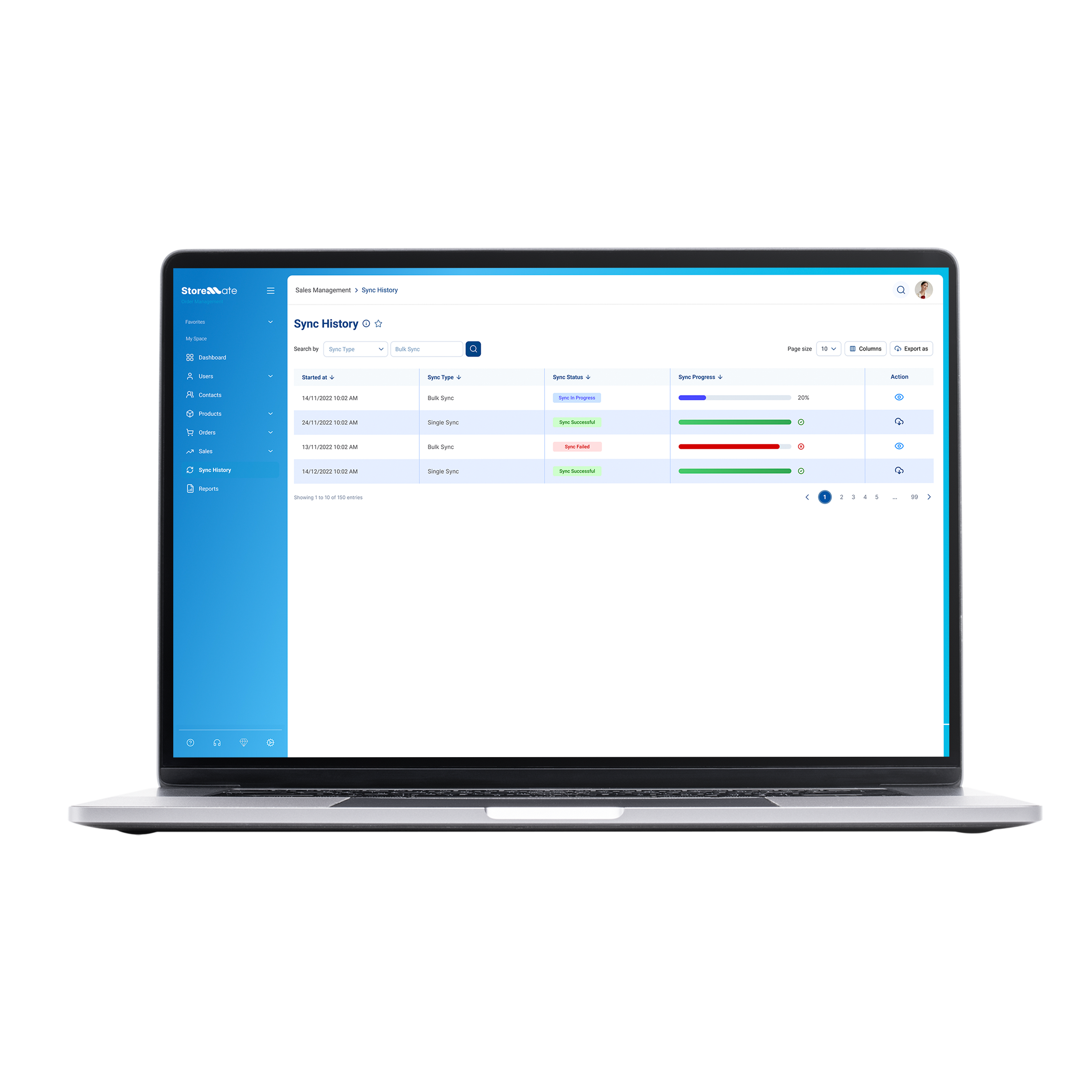
Storemate Sync History, live courier sync dashboard
Order-Level Status

Know exactly what happened to every order, instantly

Storemate tracks the sync status of each individual order. See what's pending, what's confirmed by the courier, and what needs attention, all in one view, without chasing courier portals.

  • Per-order sync status shown at a glance
  • Pending, synced, and failed states clearly visible
  • No logging into multiple courier portals to check
  • Full audit trail of every sync event per order
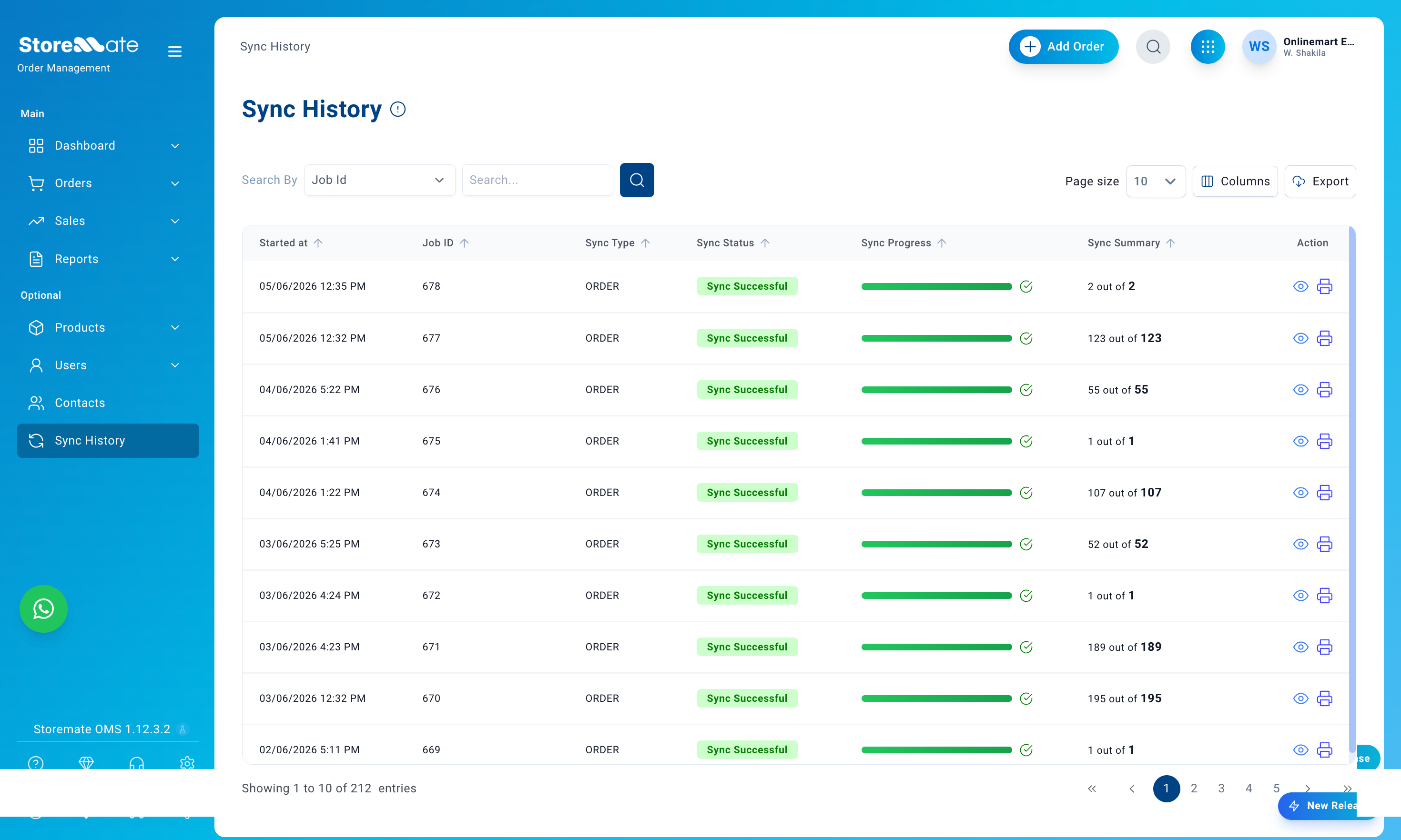
Storemate order-level sync status, see every order's courier sync state
Smart Data Mapping

Product descriptions, special instructions, branding notes, packaging details, everything syncs to the courier automatically. Nothing lost, nothing retyped wrong.

Zero information loss in the courier handoff
Instant Failure Alerts

Sync fails? You see it the moment it happens. System shows exactly what failed. One-click resync. Problem solved before the customer is affected.

Zero failed deliveries reaching customers
Last-Minute Courier Changes

Courier delayed? Switch providers at the last moment. System transfers all data to the new courier instantly, no re-entry, no re-upload, order ships on time.

On-time deliveries regardless of courier issues
The Difference

Manual spreadsheets vs Storemate automatic sync

Seven factors. One clear winner every time.

Manual Google Sheets / Excel
How most Sri Lankan sellers operate today
Before
Data Entry
Manual copy & paste. Every order. Every day. No exceptions.
Entry Errors
High. Wrong addresses. Wrong items. Wrong phone numbers.
Time Saved Daily
0 hours saved. 4–6 hours wasted on data entry per person.
Multiple Couriers
Multiple spreadsheets. Manual entries in each portal. Chaos at scale.
Real-Time Visibility
No idea what the courier received. Orders disappear into black holes.
Sync Failures
Silent failures. Orders disappear. No alert. Customer never receives.
Delivery Accuracy
5–10% wrong address or item rates from manual errors. High returns.
Storemate Automatic Sync
Built for Sri Lankan sellers who are scaling
After
Data Entry
Automatic. Zero manual work from day one.
Entry Errors
Zero. Accurate data synced directly from the source.
Time Saved Daily
4–6 hours saved per staff member, every single day.
Multiple Couriers
One platform. All couriers. All automated in one screen.
Real-Time Visibility
Live dashboard. Every order tracked from sync to delivery.
Sync Failures
Instant alert. One-click resync. Fixed immediately.
Delivery Accuracy
~0% error rate. Near-perfect accuracy from automated sync.
FAQ

Common questions about courier sync

Which couriers does Storemate sync with?
Storemate currently syncs with Royal Express, FDE Express, DomEx, TransEx, and Koombiyo, and we're adding more regularly. If your courier isn't on the list, contact our team and we'll check if an integration is possible.
Do I need to set up the courier connection myself?
No. Our team handles the full setup. When you sign up, we connect your Storemate account to your courier partner and make sure your first sync goes through correctly. You don't need to deal with API keys, portal settings, or any technical configuration.
What happens if a sync fails?
You'll see it immediately on your sync dashboard, failed orders are flagged the moment the sync attempt fails, not hours later. One click re-syncs the order. Nothing is lost silently and no order slips through to the customer as unshipped.
Can I use multiple couriers for different orders?
Yes. You choose which courier to sync each order to, or split orders across multiple couriers from a single screen. You can also switch couriers at the last moment without re-entering any data, Storemate transfers everything to the new courier automatically.
How quickly does an order sync to the courier?
Syncs happen in seconds. The moment you confirm the sync, the order data is sent directly to the courier's system, no batch delays, no scheduled uploads. The courier receives the full order immediately.
Do I still need to log in to the courier portal after syncing?
No. Once the sync is confirmed, the courier has everything they need. Your team manages all orders from Storemate, there's no reason to log in to a separate courier portal. The sync dashboard gives you full visibility of what was sent.
What information gets sent to the courier when an order syncs?
Everything the courier needs, customer name, delivery address, phone number, product description, COD amount, special handling notes, and any packaging instructions. Nothing needs to be re-entered or filled in manually on the courier side.

Can't connect your courier partner?

If you run into trouble connecting your courier or your courier isn't listed, our support team will handle it directly. Just reach out, we'll get the integration set up for you.

Talk to our support team →

Ready to automate
your courier sync?

Start for free. Full setup handled by our team. Your first order synced together with us. No card needed.

Built from the experience of 25M orders and 30,000+ Sri Lankan sellers.